The Multipage Canvas explained
Understand the infinite, multipage studio at the heart of Grout App.
Written By Grout
Last updated 5 months ago
The workspace in Grout App is not a linear chat thread. It is a sprawling, infinite, multipage studio where every kind of content lives together and can be freely arranged.
What lives on the canvas
On a single canvas you can place and rearrange:
Text blocks and notes
Images and sketches
3D models
Diagrams and visual aids
AI conversations and generated content
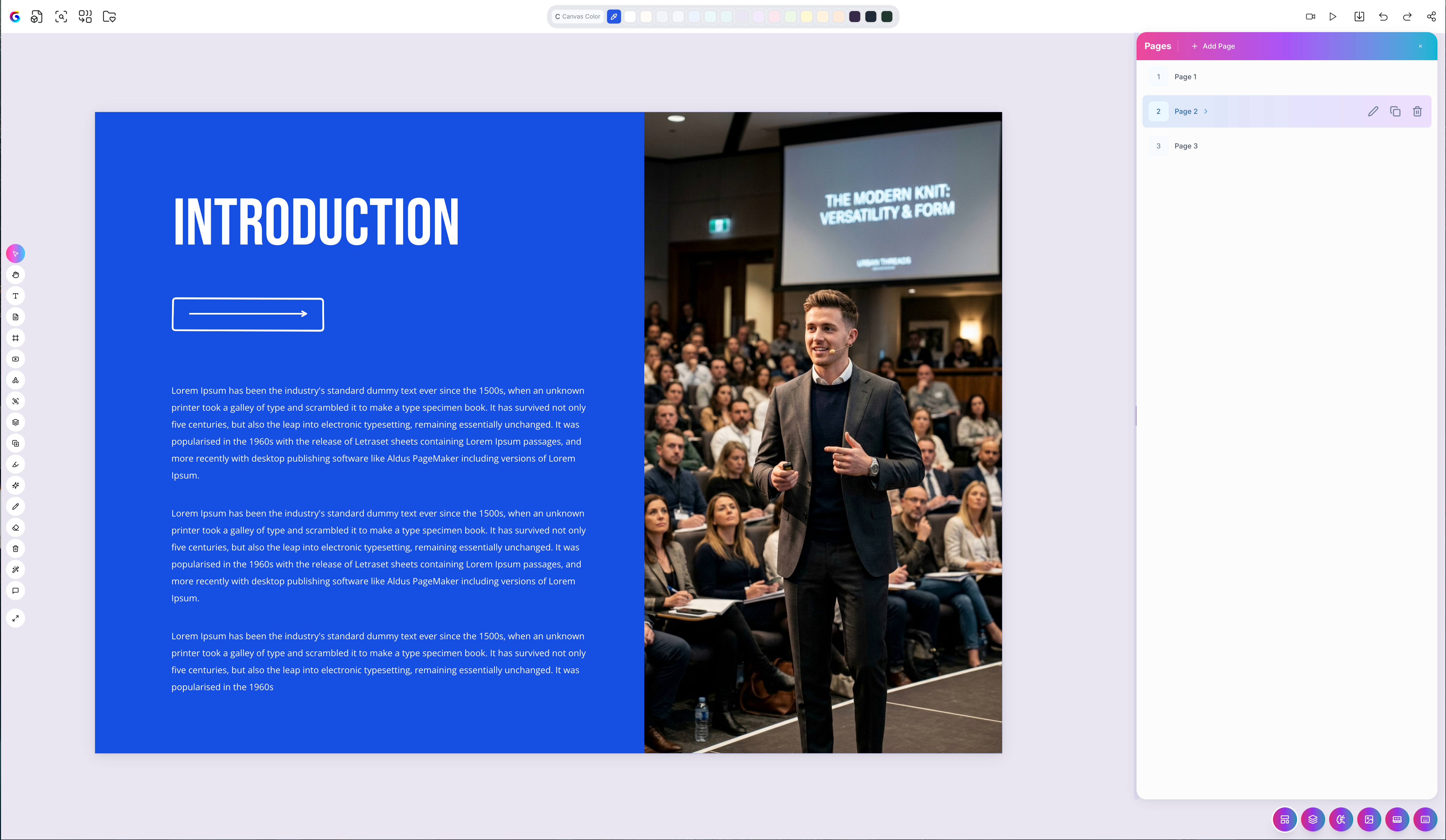
Why a canvas instead of a chat
A chat log forces your thinking into a single scrolling line. A canvas lets you lay ideas out spatially — group related material, keep a diagram next to the notes that explain it, and see the whole shape of a project at once. This is what makes Grout App suited to deep, sustained work rather than quick questions.
Pages
The canvas is multipage, so you can separate a large project into distinct pages while keeping everything in one workspace. Use pages to divide a project by topic, chapter, or stage.
Arranging your work
Every element on the canvas can be moved and positioned freely. There is no fixed grid forcing your layout — arrange things the way that matches how you think.
Note: A canvas is single-player. One person works on one canvas at a time — see Single-player mode explained for details.
Was this helpful?
Still need help? Ask the team