Managing your account settings
Update your profile, devices, and ecosystem-wide preferences from your distributor portal.
Written By Grout
Last updated 4 months ago
Account settings for the entire Grout ecosystem are managed on your distributor web portal, not inside the apps.
Where to manage your account
Visit the region-specific distributor URL you used when purchasing your license (for example, distributor.grout.app — the exact subdomain depends on your region). Sign in there with the same email you use for the apps.
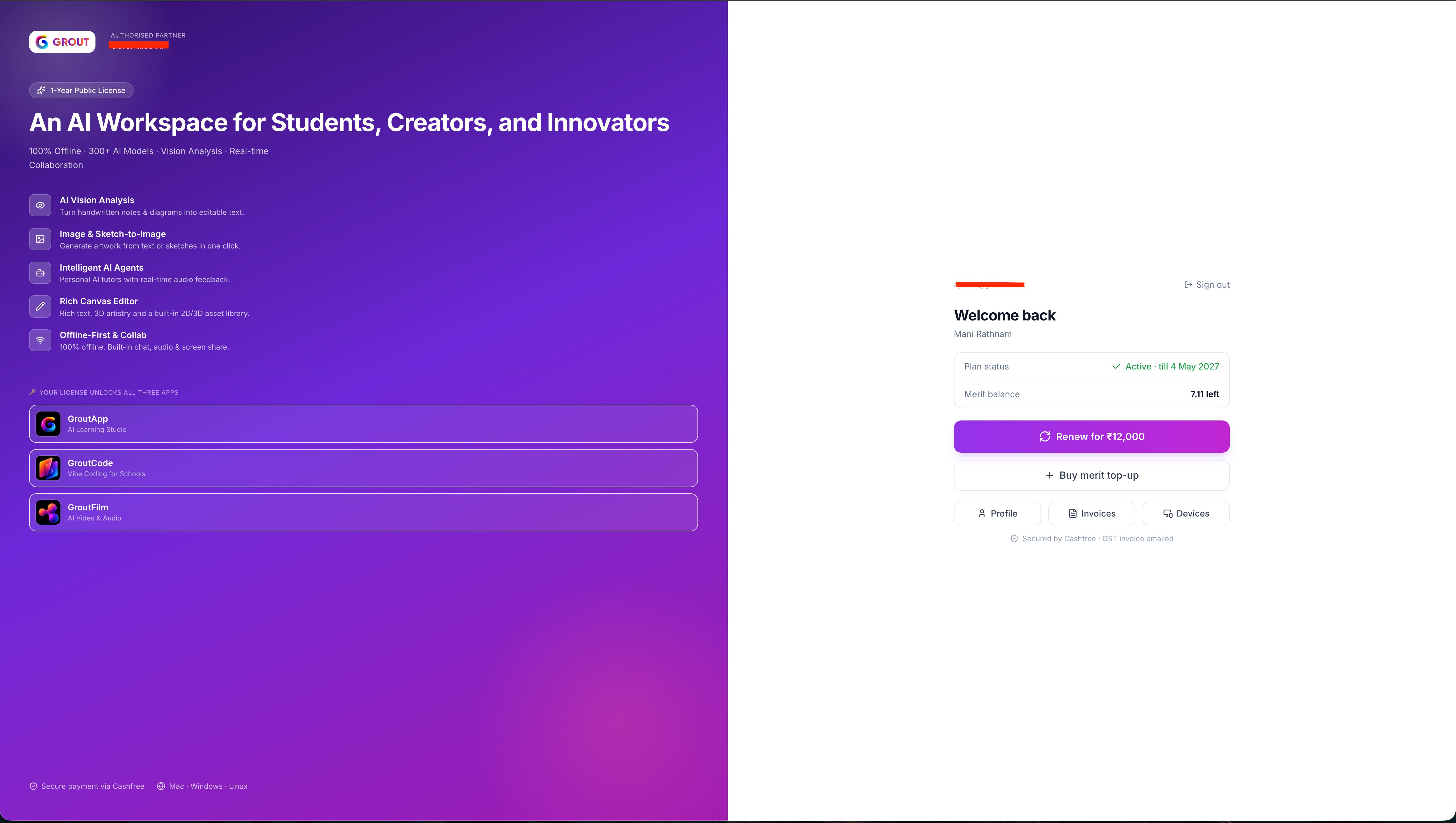
What you can update
Profile — your name and profile details.
Devices — review and manage the devices signed into your account.
Invoices — view past invoices.
Plan & Merits — renew your license, buy Merit top-ups.
What you cannot change
Your email — it's permanently linked to your Grout license and cannot be changed. If you need help, contact your distributor.
Your password — there isn't one. Grout uses OTP-based sign-in, so there's no password to manage, change, or reset. See Unified one-click sign-in across the Grout ecosystem.
Settings inside the apps
Each Grout app (App, Code, Film) has its own product-specific preferences inside the app — like AI model choices, canvas options, or editing defaults. These are separate from your account-level settings on the distributor portal.
Related
See Unified one-click sign-in, Managing billing and subscriptions, and Understanding and managing API credits.
Was this helpful?
Still need help? Ask the team