Running AI offline with Local AI in Grout Code
Download a coding model that runs fully on your computer — free, private and offline.
Written By Grout
Last updated 20 days ago
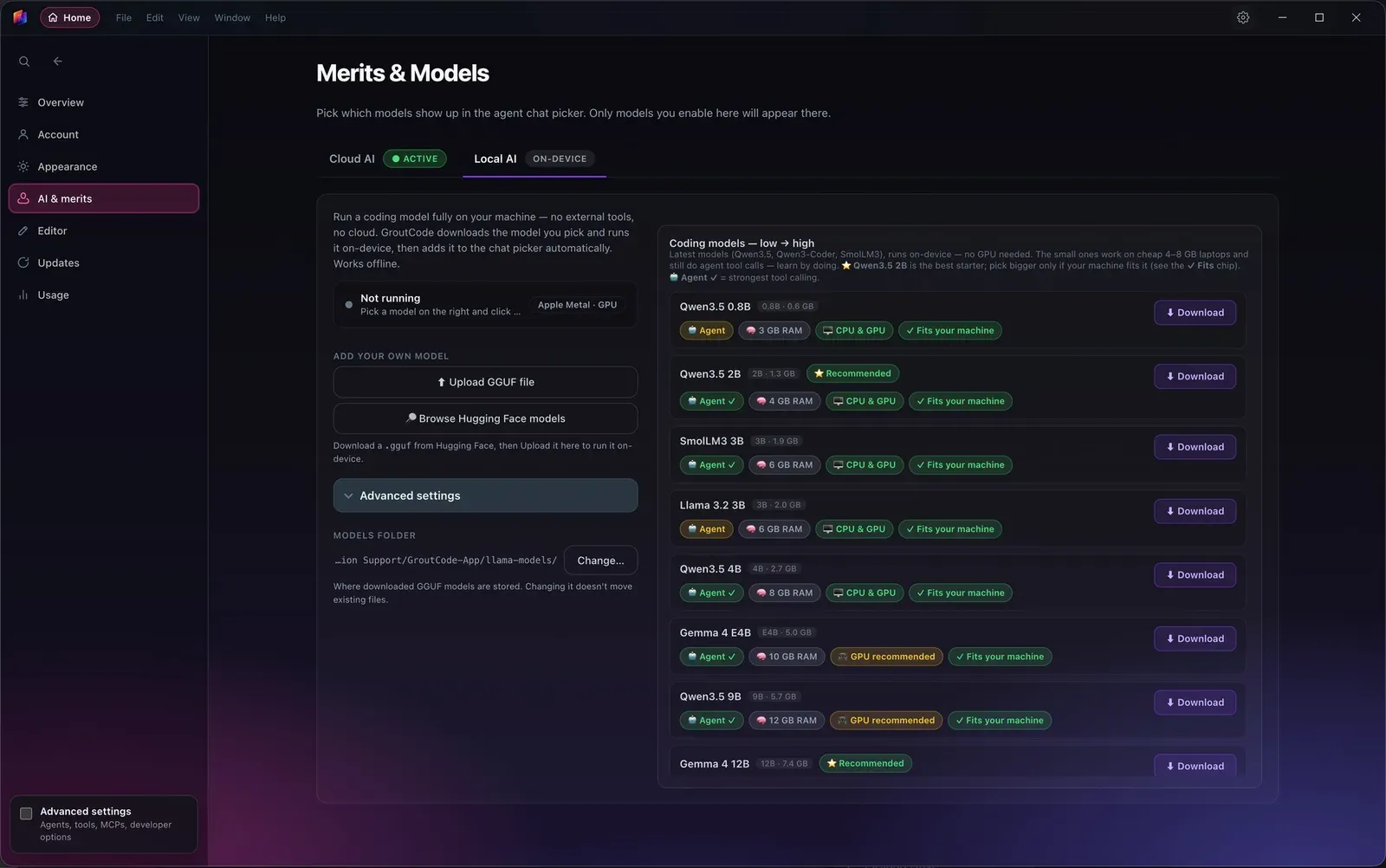
Open Settings → Merits & Models → Local AI.
In the model list, check the chips: whether it can run the Agent, RAM needed, CPU/GPU, and Fits your machine, Tight on RAM or Needs N GB.
Press Download. Qwen3.5 2B is the recommended starter (1.3 GB download, 4 GB RAM); Gemma 4 12B is recommended for stronger machines.
Press Use. The status changes to Model running and it appears in the chat picker.
Use Stop or Delete to free resources.
More options
Add your own model: Upload GGUF file or Browse Hugging Face models.
Advanced settings: context size, GPU layers and port, then Apply & restart.
Models folder: change where models are stored (existing files are not moved).
Acceleration: Apple Metal on Mac, Vulkan on PC, optional NVIDIA CUDA.
Too slow? Pick a smaller model, or one marked Fits your machine.
Was this helpful?
Still need help? Ask the team